Production Demand & Backlog
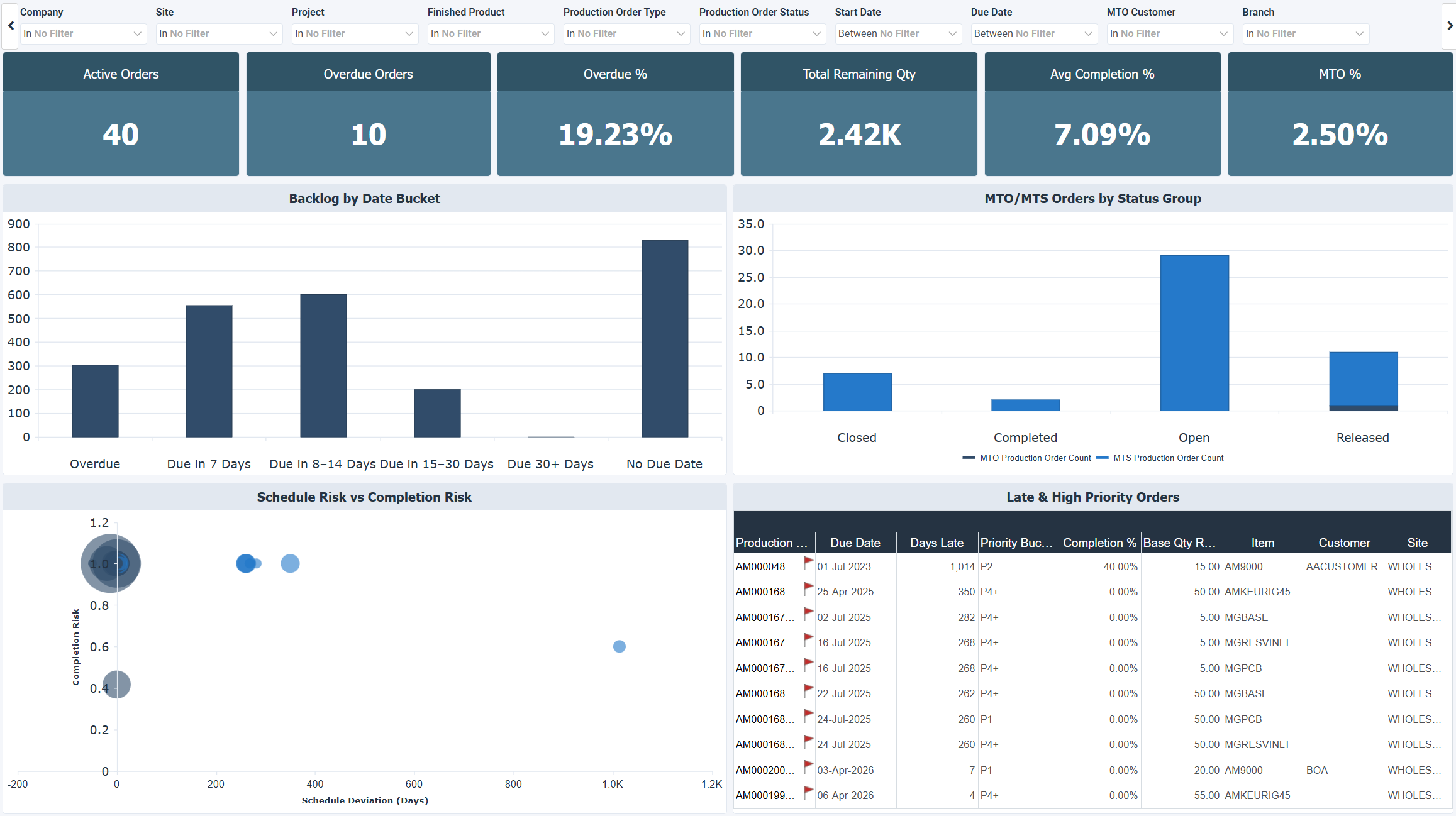
The Production Demand & Backlog dashboard provides visibility into the current state of the production backlog, including active order volume, overdue orders, remaining quantities, and completion progress. It covers how much work is still outstanding, how urgent it is, and whether the backlog is driven by customer orders or inventory replenishment. Use this dashboard to prioritize the most urgent orders, assess overall backlog health, and align production execution with demand.
When reviewing this dashboard, a high Overdue % typically signals a scheduling or capacity issue rather than an isolated execution problem. A large portion of backlog with no due date is a planning gap that should be addressed before it becomes an execution risk. Orders that are both significantly late and barely started represent the highest operational priority. Keep in mind that Avg Completion % can be misleading when many small completed orders coexist with a few large unfinished ones. A high MTO % means delays have a direct impact on customer satisfaction rather than just inventory levels.
Benefits of this dashboard
- Quantify the active production backlog by volume, urgency, and remaining work.
- Identify overdue and at-risk orders before they escalate into missed commitments.
- Distinguish between MTO and MTS orders to understand the customer impact of delays.
- Spot planning gaps such as orders with no due date that could create future execution issues.
- Focus attention on the highest-risk orders using schedule deviation and completion progress together.
Key performance indicators (KPIs)
Key performance indicators (KPIs) are displayed at the top of the dashboard. They give you an at-a-glance summary of the current backlog situation and update based on the filters you apply.
| KPI | Description |
|---|---|
| Active Orders | Total number of open production orders currently in the system. |
| Overdue Orders | Number of active production orders that have passed their due date. |
| Overdue % | Percentage of active orders that are past due, a key indicator of scheduling or execution issues when the value is high. |
| Total Remaining Qty | Total quantity still to be produced across all active orders, reflecting current workload and capacity pressure. |
| Avg Completion % | Average progress across all active production orders. Best interpreted alongside order count and size distribution. |
| MTO % | Percentage of production tied directly to customer orders. A higher value means delays are more likely to affect customer satisfaction directly. |
Visual components
| View | Type | What it shows |
|---|---|---|
| Backlog by Date Bucket | Vertical Bar | Groups active production orders by urgency: Overdue, Due in 7 Days, Due in 8-14 Days, Due in 15-30 Days, Due in 30+ Days, and No Due Date. Highlights where the most urgent work is concentrated and exposes planning gaps. |
| MTO/MTS Orders by Status Group | Stacked Bar | Shows the distribution of Make-to-Order and Make-to-Stock orders split by status group. Helps understand the production strategy mix and where orders stand in the workflow. |
| Schedule Risk vs Completion Risk | Bubble | Plots each production order by schedule deviation (X-axis) against completion % (Y-axis), with bubble size reflecting remaining quantity. Orders in the top-right area are both significantly late and incomplete, representing the highest operational risk. |
| Late & High Priority Orders | Worksheet | Operational drill-down of the most critical orders, showing days late, priority bucket, completion %, and remaining quantity. The starting point for daily execution decisions. |
Example dashboard
Filters
Use the filtering panel at the top of the dashboard to control which data is shown. The filters apply to all views and ensure the dashboard reflects the selections you choose.
- Company
- Site
- Project
- Finished Product
- Production Order Type
- Production Order Status
- Due Date
- MTO Customer
- Branch