SQL Server Source Connector
The SQL Server source connector lets DataSync retrieve data from Microsoft SQL Server database and load it into your data warehouse. Once your source connection is ready, configure your destination connection to finish the setup.
Create the source connection in DataSync
- Log in to DataSync.
- From the welcome screen, select Connections.
- Next to Source Connections, click New.
- Select SQL Server.
- Enter all required connection properties.
- (Optional) In the Additional Connection Properties panel, click Add property and enter any extra parameters you need.
- Configure the advanced settings to match your environment, including Tracking Type.
- Click Save.
Connection properties
| Property | What to enter |
|---|---|
| Description | Unique name for the connection. Example: SQL Server. |
| Server | Server name or IP address of the SQL Server database. Example: SQLSERVER01\MAIN or 192.168.1.50,1433. |
| Database | Name of the SQL Server database to connect to. Example: SalesDB. |
| Username | Login account for accessing the database. Example: dbadmin. |
| Password | Password for this account. |
| Timeout | Time in seconds to wait before a connection attempt or query execution times out. |
| Encrypt | Enables SSL encryption for the connection. Recommended when data security is a priority. |
| Trust Server Certificate | Bypasses SSL certificate validation. Enable only if your server uses a self-signed certificate. |
Additional connection properties
Use this panel to enter connection string properties not available in the Connection Properties panel. For sensitive values such as passwords, set the type to Encrypted. The value is hidden in the interface and stored encrypted in the back end.
| Property | What to enter |
|---|---|
| Property | Connection string property that defines the action or behavior. Example: ReadOnly. |
| Value | Value for the property. Example: True. |
| Type | Visibility settings: Visible or Encrypted. |
Advanced settings
These settings control how the connector tracks data changes, handles time and regional configuration, and processes records during extraction. Configure them to match your SQL Server environment so that results stay accurate and consistent.
| Setting | What to select |
|---|---|
| Tracking Type | Method for tracking data changes: None or Date. |
| Region | Region setting for the connector, if required by your setup. |
| Time Zone | Time zone matching your SQL Server environment. |
| Time Offset | Refresh offset in seconds to compensate for timing issues in record selection. Minimum 0, maximum 3600. |
| Batch Size | Number of records processed per batch during extraction. Larger batches can improve performance but use more memory. Default is 2000, maximum is 10000. Adjust based on your network speed and disk performance. The default works well in most cases. |
| Transaction With (NOLOCK) | Allows extractions to run without waiting for concurrent write operations to finish. |
Example setup
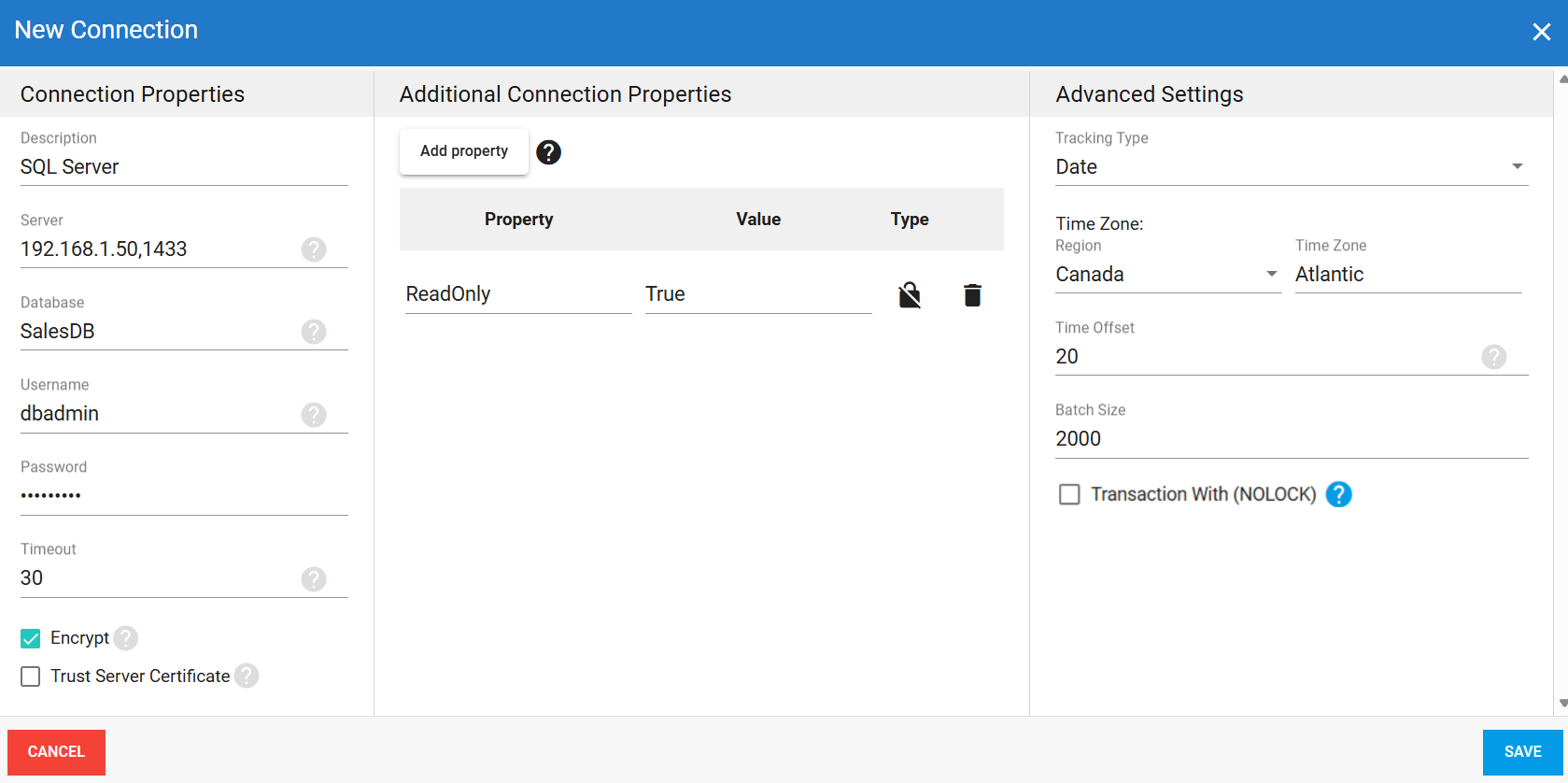
When to use Transaction With (NOLOCK)
By default, DataSync waits for any active write operations to finish before reading from a table. If another process writes to the same table during an extraction, the two operations can block each other and cause the sync to stall. Checking Transaction With (NOLOCK) prevents this by avoiding the conflict between reads and writes on the same table.
Enable this option when:
- You run a live application that writes to the source table throughout the day, and frequent DataSync extractions running against that same table keep getting blocked or delayed because of those writes.