Exporting a Template
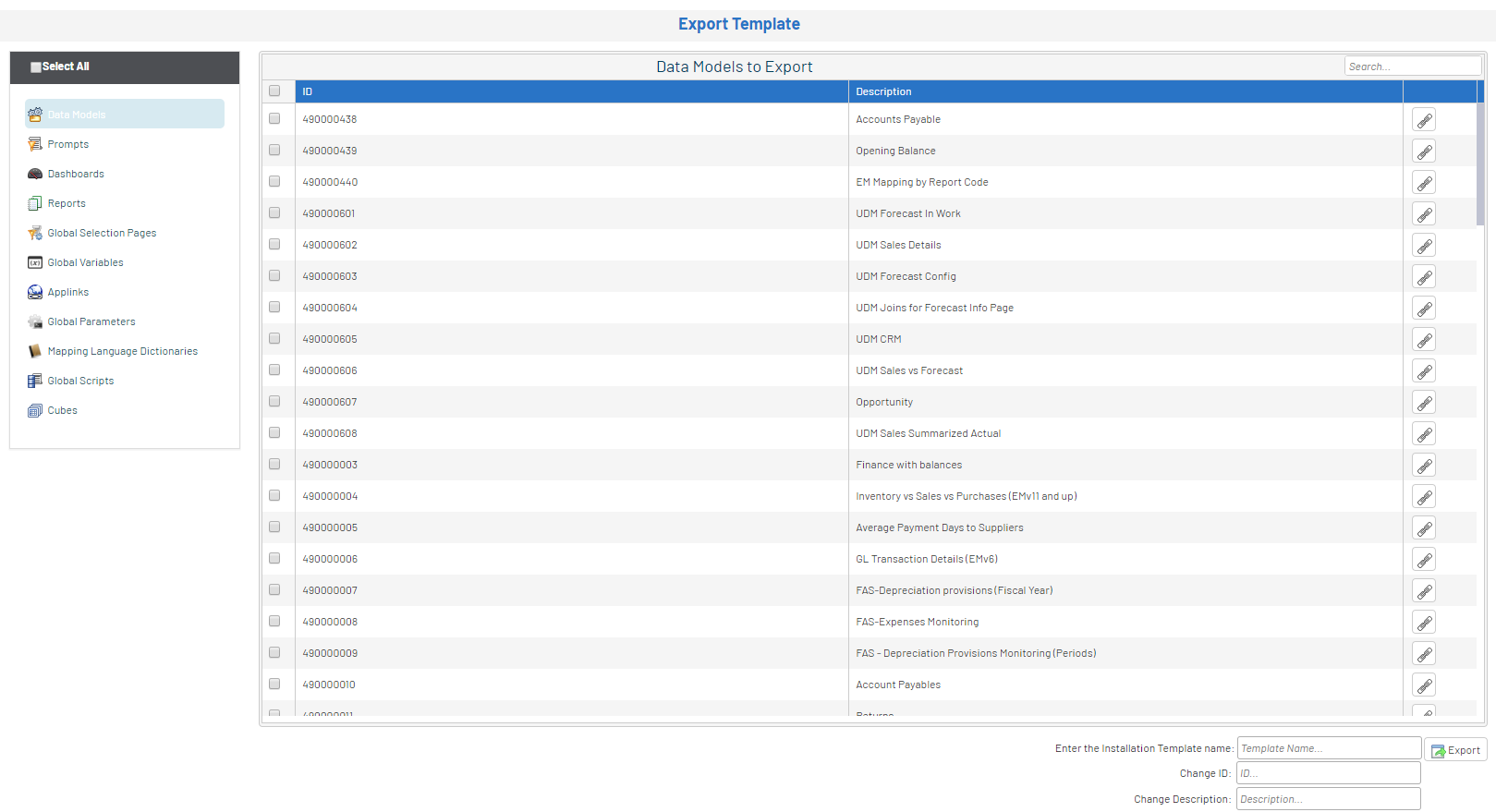
The Export Template option allows you to export any SEI objects (Data Models, Views, Prompt, Global Parameters, etc.) to a zip file in order to be imported into any SEI installation.
To export a template:
- In the Administration section
 , click the
  Templates drop-down menu in the left pane.
 -
Select
 Export Template.
The Data Models tab displays the execution report related to the installation of this specific object.
The window is divided in two main sections.
On the left, we have a menu with the list of all the different object types and on the right, we have all the objects corresponding to the selected object type.
The Select All option will automatically select all the objects. By default, when selecting a Data Model, all the related objects will be selected (Views, Prompts, etc).
On the right, clicking the icon
 will display all of the related objects.
-
Select the desired objects.
-
In the lower right hand corner, enter a template name and a description.
-
Click Export. The file will be automatically saved into your Downloads folder.